Add Task:
- Navigate to Dashboard->Task
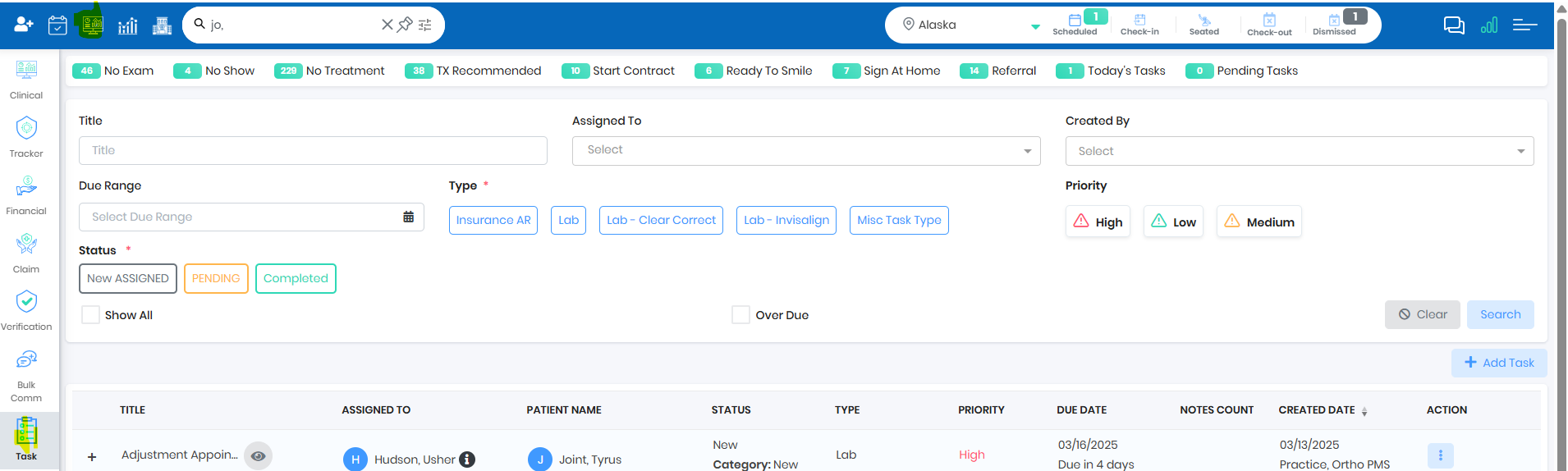
- Click on Add Task to create a new Task
- Provide Task Title, Assigned single or Multiple users, configure Due Date , Task Type, Task Status and Priority
- Provide Notes to explain the task to the assigned user
- Save and Close
Search Task:
- Navigate to Dashboard->Task
- Use different search filter to search a Task
- Show All will show all the archived Tasks
- Over Due will filter and show the tasks which are Over due
Was this article helpful?
That’s Great!
Thank you for your feedback
Sorry! We couldn't be helpful
Thank you for your feedback
Feedback sent
We appreciate your effort and will try to fix the article